Scripts / TML Admin Panel

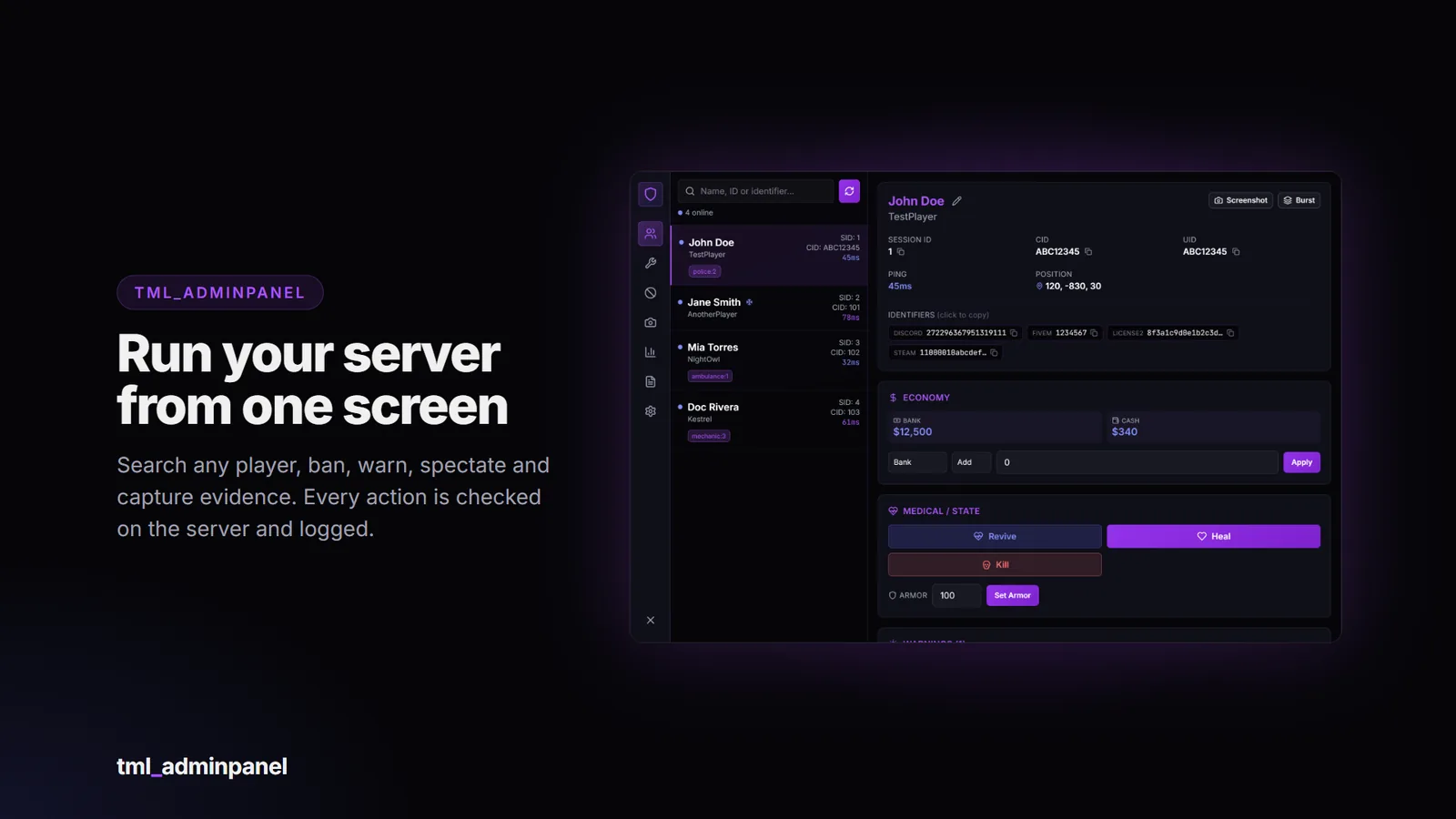
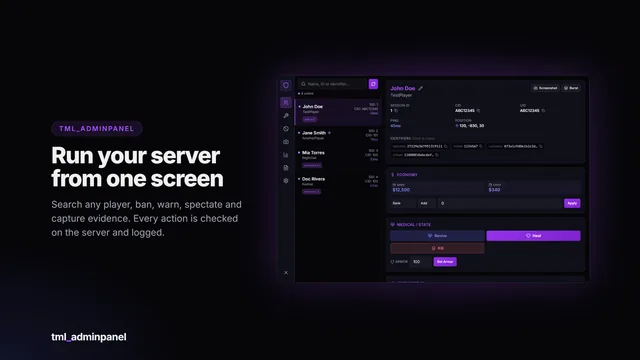
An admin panel for your whole server, built to work with the framework you already run. Pull up any player, online or offline, and manage them from one searchable screen (F7). Every action is checked on the server, permission gated and logged, so you can give trial moderators fewer tools than senior admins and always see who did what.

Features

  • Players: live list plus search across online and offline characters. Freeze, kick, ban, teleport (go to / bring), spectate, rename a character, revive, heal, kill, set armor.
  • Bans that do not depend on your framework. They are matched on raw FiveM identifiers when a player connects. Ban a player, or ban a Discord, licence, FiveM or Steam ID before they ever join. Adaptive Card or plain-text ban screen, appeal link, ban ids and a searchable ban history.
  • Warnings and notes on every character, kept even when the player is offline.
  • Money and vehicles: view and adjust bank and cash, and locate, store, impound, delete or re-garage a player’s vehicles (where your framework stores them).
  • Screenshot evidence: capture a player’s screen, burst-capture, or run timed surveillance. A shared gallery with pinning for evidence that should not expire. Uploads happen on your server, so your upload key is never sent to players.
  • Admin tools: noclip, invisibility, player nameplates, map blips, self vehicle spawn / repair / clean / flip, announcements, ped model browser.
  • Troll actions in three permission tiers, each gated separately, so you decide who gets which.
  • Granular permissions: 38 permissions on top of your ACE groups, and admins can grant or revoke them per person from inside the panel.
  • Full audit log of every admin action, searchable.
  • Yours to adapt: English and Spanish included, colours in one theme file, and the framework adapters are open files you can edit.

Requirements

  • FiveM server with OneSync
  • ox_lib and oxmysql (tables are created automatically, no manual SQL needed)
  • A supported framework (auto-detected), or standalone mode using ACE permissions
  • Optional: screenshot-basic for player screenshots

Compatibility

The panel talks to your server through an open bridge layer, so it isn’t tied to one setup.

CategoryIncluded adapters
FrameworkQbox, QBCore, ESX, ox_core, ND_Core, standalone, custom
Standalone (no framework)Bans, kick, teleport, spectate, screenshots, warnings, notes and tools. No characters, money or vehicles.

The bridge files are not encrypted: if your framework is unusual, or an included adapter needs a tweak, you can edit the adapter yourself. A blank custom adapter is included for anything else. ND_Core does not support vehicle management. vRP is not supported.

Installation

  1. Drop tml_adminpanel into your resources folder.
  2. ensure tml_adminpanel after ox_lib, oxmysql and your framework.
  3. Give staff access with ACE:
    add_ace group.admin tml_adminpanel.admin allow
    add_principal identifier.license:xxxxxxxx group.admin
  4. Start the server (the database tables are created automatically) and press F7.

A full install guide and config reference are included. Changelogs and update announcements are posted in the Discord.

Important: Cfx.re Asset Escrow

This resource is distributed through the Cfx.re Asset Escrow system. Please read before purchasing.

  • The main client and server code is encrypted by Cfx.re’s escrow. It can’t be viewed or edited, and it can only run on a server whose license key belongs to the Cfx.re account that purchased it.
  • These files are left open so you can customise them: the config file, language files, all bridge adapters (framework and notifications), the theme file (theme.css), the data folder, the install files and the documentation.
  • You need a Cfx.re (Keymaster) account and a server using that account’s license key. The resource will not run on a server registered to a different account.
  • One purchase covers one server.
  • Do not resell, share, leak or redistribute the files or the encrypted assets. Doing so violates the license and Cfx.re’s terms.

Purchase terms

  • All sales are final: no refunds. Check the requirements and compatibility above, or ask in the Discord, before buying. Price drops and later sales are not refunded.
  • Free lifetime updates, granted to the same Cfx.re account.
  • No account transfers. Licences are not moved between Cfx.re accounts, so buy with the account that owns your server key.
  • Chargebacks and leaks mean the licence is revoked and your accounts are banned from support and future purchases. Report leaks to [email protected].
  • Payments are handled by Tebex, and anything not covered here follows Tebex’s terms.

Support

Support covers installation help, bugs in the shipped code and the documented config. It does not cover custom framework integrations, heavily modified forks, conflicts with unrelated scripts, general server setup or account transfers.

Join the Discord for support: https://discord.gg/RPzkXrDUEQ

Screenshots show the interface rendered with sample data.

FAQ

Common questions

The panel does not open.

Check that you have ACE access (add_ace group.admin tml_adminpanel.admin allow and your license in a group), then use ensure tml_adminpanel after ox_lib, oxmysql and your framework. If you set Config.AcePrefix, use that prefix instead.

"Access Denied" when I press F7.

You are not in a group listed in Config.StaffGroups. Reconnect after adding the ACE line, or run refresh and restart.

Which framework is it using?

The console prints framework=... at start. Set Config.Framework to force one. standalone means none was found.

The console says the framework started after this resource.

Harmless. Resource start order is not guaranteed and the panel switches to the framework once it appears. Put ensure tml_adminpanel after your framework to avoid the message.

Offline players or vehicles do not show up.

That data comes from your framework's database tables. Standalone has none. On ND_Core there is no vehicle management. If your framework is a fork with different tables, edit the queries in bridge/framework/<framework>.lua.

All TML Admin Panel questions →

More from TML

You might also like

TML Billing

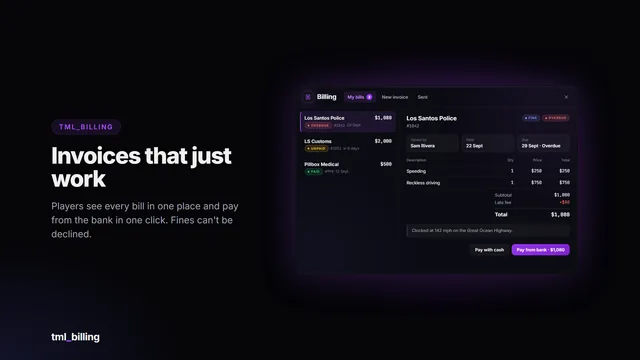
Itemised invoices and fines that just work. Businesses bill the person standing next to them in a few clicks; players see every bill in one clean window and pay from the bank in one click. The money…

…
Details

TML Monitor

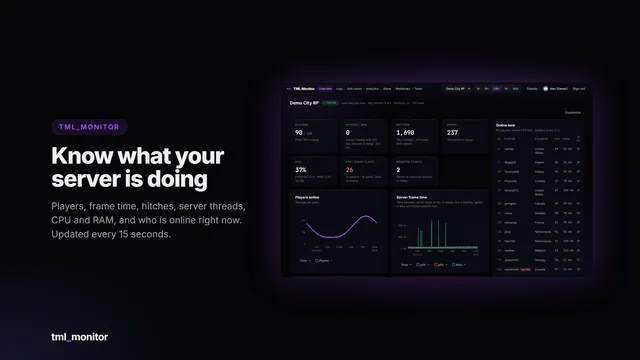
Live performance, every log and server-side anti-cheat signals for your FiveM server, in a web dashboard you and your staff open from any browser or phone.
  • Live dashboard
  • Server-side anti-cheat
  • 30 days of logs
…
Details

TML Pager

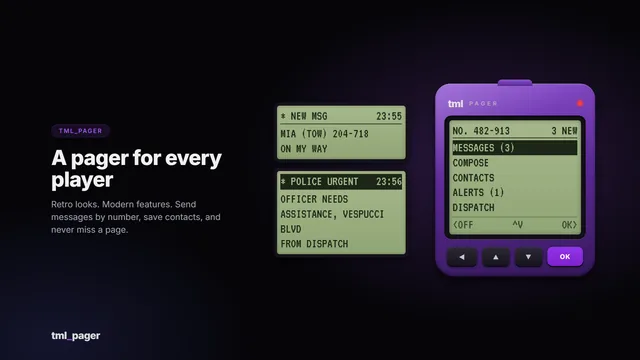
A retro pager with modern features. Every character gets a pager number, then sends short messages, saves contacts and receives department dispatch alerts.

  • 7 frameworks
  • Dispatch alerts
  • Item optional
…
Details

TML Phone

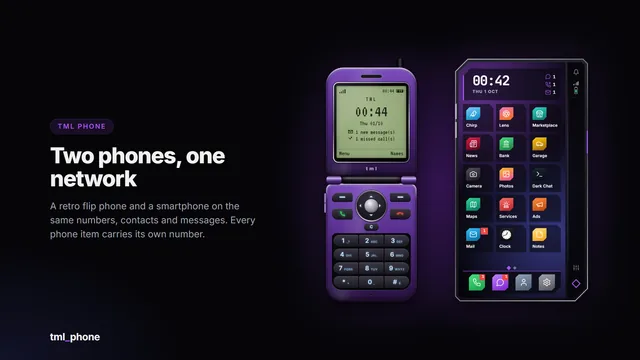
A retro flip phone and a modern smartphone on the same numbers, contacts and messages. Calls, video calls and 17 apps, and every phone item can carry its own number.

  • Flip + smartphone
  • 17 apps
  • Video calls
…
Details

TML Queue

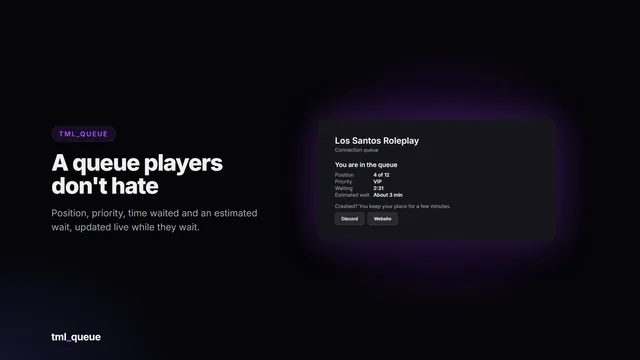
A connection queue players don’t hate. When your server is full, players wait on a live queue card with their position, priority, time waited and an estimated wait. Priority comes from Discord roles,…

…
Details

TML Radio

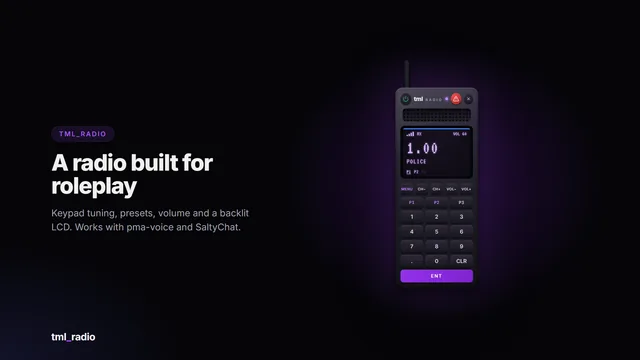
A handheld two-way radio that feels like the real thing: a backlit LCD, a keypad, channel and volume buttons, and a status LED that turns purple when someone’s talking and red when you are. Emergency…

…
Details
TML Admin Panel…
Esc

↑↓ to move Enter to open

Keyboard shortcutsEsc
Ctrl K or /
Search pages, scripts and docs
G then H
Go to Home
G then S
Go to Store
G then P
Go to Previews
G then D
Go to Docs
G then I
Go to Install helper
G then F
Go to FAQ
C
Open the cart (store pages)
?
Show this list