
TML Admin Panel
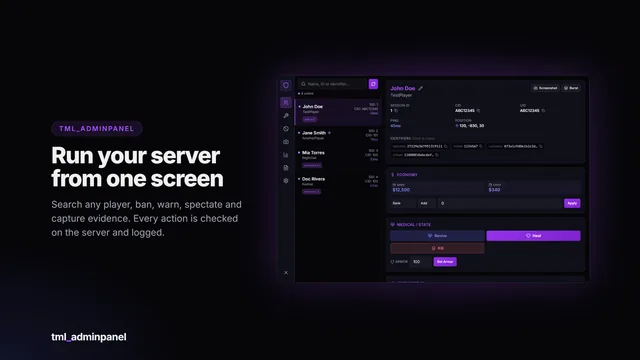
A searchable in-game administration panel with automatic framework detection, a framework-independent ban system and every action permission-gated and logged.
- 38 permissions
- Framework-free bans
- Audit log
Multi-framework resources with open configs and adapter files, so they slot into your setup instead of making you rebuild it.
A searchable in-game administration panel with automatic framework detection, a framework-independent ban system and every action permission-gated and logged.
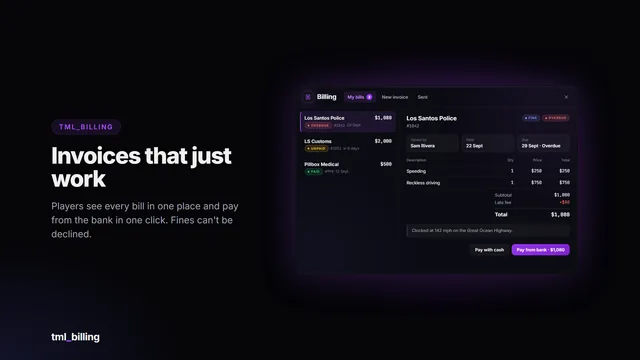
Itemised invoices and fines that just work. Businesses bill the person standing next to them in a few clicks; players see every bill in one clean window and pay from the bank in one click. The money…
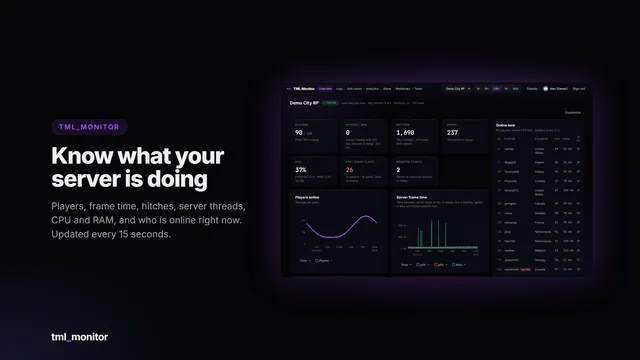
Live performance, every log and server-side anti-cheat signals for your FiveM server, in a web dashboard you and your staff open from any browser or phone.
Pick what your server runs; skip anything you don't use. Your picks stay in this browser.
Every script talks to your server through open bridge adapters, and each category ships a blank custom adapter, so anything not listed can still be connected. Ask in the Discord before you buy if you're unsure.
Each script talks to your framework and inventory through small adapter files, so it runs on Qbox, QBCore, ESX, ox_core and others without a rewrite.
Configs, translations, themes and the adapter files are not encrypted, so you can change them. Only the core code is protected by Cfx.re Asset Escrow.
Every action is validated and rate limited server side, and each script exposes documented exports for your own resources.
Install help and bug fixes come from the person who wrote the scripts.
Add a script to your cart and sign in with your FiveM (Cfx.re) account. Tebex handles payment.
The script lands in your Cfx.re Granted Assets, protected by Asset Escrow.
Unzip into resources, edit the config file, ensure it. The docs walk through the rest.
Custom scripts, changes to an existing TML script, or an integration with your own setup. Open a ticket in the Discord with what you need, and we'll discuss scope, price and timing there.
Read the docs or ask in Discord before you buy.